Setting up earnings
your builder code on every order.
How the Hyperliquid builder fee works, what the protocol lets you charge, the one approval each trader gives, the 100 USDC prerequisite, and how to confirm it works. The same material ships in the project as DOCS/EARNING.md.
01How you earn
Hyperliquid lets the builder of an interface attach a builder code to an order: your address plus a fee rate. When the order fills, the venue charges your fee on the filled amount, on top of its own exchange fee, and credits it to your address. A partly filled order pays on the part that filled.
You earn on orders placed from your build of AXIS, by wallets that have approved your fee. Nothing else.
No builder address, fee off. Out of the box no order carries a builder code and nobody is charged. There is no default vendor address anywhere in the source.
02The fee, in numbers
AXIS sets the fee in tenths of a basis point. Example amounts only; what you actually earn depends on your users' filled volume.
| Setting | Basis points | Percent | Example: fee on a 10,000 USDC fill |
|---|---|---|---|
1 | 0.1 bp | 0.001 % | 0.10 USDC |
10 | 1 bp | 0.01 % | 1.00 USDC |
50 | 5 bp | 0.05 % | 5.00 USDC |
100 | 10 bp | 0.1 % | 10.00 USDC |
03The caps
- Perps: 0.1 % maximum (
100in AXIS units). An order carrying a higher builder fee is rejected by the venue: you earn nothing and the user's order fails. - The trader's approval is its own ceiling. Each wallet approves a maximum rate. If you raise your fee above it, AXIS drops the builder code for that wallet and asks it to approve the new rate on its next order.
AXIS checks the cap in two places, both failing to no builder code rather than to no trading: AdminConfigProvider.hyperliquidBuilder and HyperliquidProvider.sanitizeBuilder. The operator console also rejects an over-cap value at the field.
04The approval each trader gives, once
Hyperliquid will not charge a wallet a fee it has not agreed to. Each trading wallet signs ApproveBuilderFee once per builder address. In AXIS this happens on the trader's device, at their first order:
- The trader places an orderAXIS reads the wallet's on-chain approval (
maxBuilderFee) for your address. - No approval, or too lowA dialog names the fee and asks the trader to approve it. Declining cancels the order. Nothing is signed silently.
- ApproveSigns at the higher of your perps and stock rates, so one signature covers both.
The approval is on chain, per wallet and per builder address. It survives restarts and reinstalls. The order ticket counts the app fee in Est. fees only when the approval is known to cover it; otherwise it shows it as "App fee (after approval)".
05The 100 USDC prerequisite
Hyperliquid does not pay builder fees to an address holding less than 100 USDC of perps collateral. Nothing rejects the setup: orders fill, and no fee arrives.
- Fund the builder addressAt least 100 USDC in its Hyperliquid perps account (not spot, not on Arbitrum). One way: import that wallet into AXIS and use Deposit on the Trade screen, which bridges native USDC from Arbitrum (minimum 5 USDC per deposit).
- Check the account modeThe builder address must be in standard account-abstraction mode. Earnings → Prerequisites shows the current mode beside the requirement.
06Set it up: the checklist
- Fund the builder addressRequired 100 USDC or more of perps collateral (above).
- Publish your feeIn your
config.jsonor Firebase config, for all users:
The"builder_fee_enabled": true, "builder_address": "0x<your-builder-address>", "builder_fee_tenths_bps": 10, "builder_fee_stock_tenths_bps": 010is an example rate. To test first on your own device only, set the same fields in Account → Operator console → Earning — builder fee (details). - Switch perps on
"hyperliquid_perps_enabled": true, when your jurisdiction and store allow it. - RecheckEarnings → RECHECK. The title should read BUILDER CODE ATTACHED and Prerequisites should show the collateral met.
- Place one small orderFrom a trading wallet. Approve the fee dialog.
- Recheck againMAX BUILDER FEE ON CHAIN shows your rate, ORDERS CARRY THE FEE reads YES, and ORDERS WITHOUT THE FEE is
0.
07The Earnings screen
Every figure is your configuration or a live read from Hyperliquid. Nothing is projected.
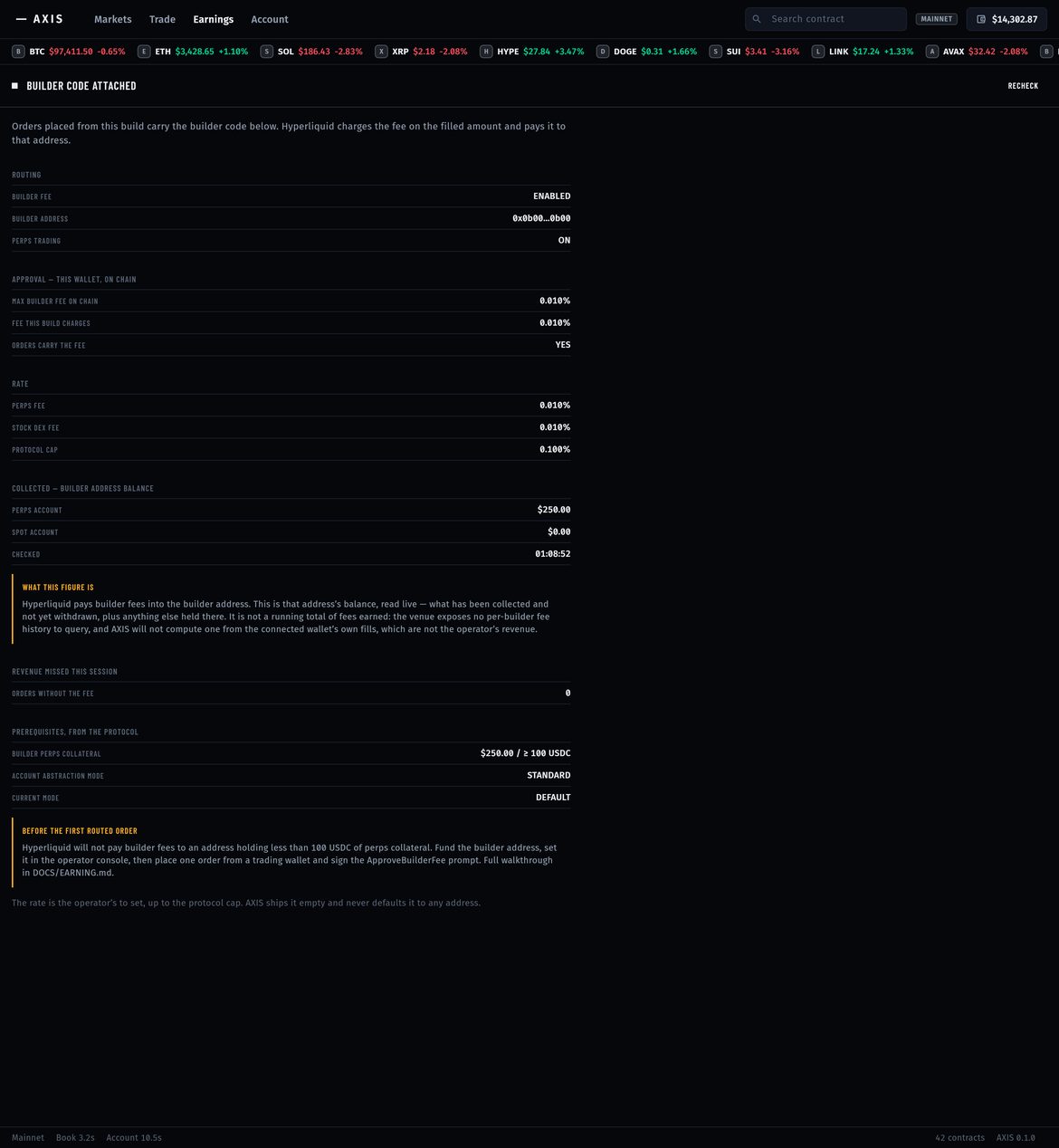
| Block | Shows |
|---|---|
| ROUTING | Builder fee on or off, the address, whether perps trading is on. |
| APPROVAL — THIS WALLET, ON CHAIN | The maxBuilderFee this wallet approved, the fee this build charges, and whether orders carry the fee. UNKNOWN means the lookup failed, not zero. |
| RATE | Your perps and stock dex fees and the protocol cap. |
| COLLECTED — BUILDER ADDRESS BALANCE | The live perps and spot balance of your builder address. |
| REVENUE MISSED THIS SESSION | Orders that went out without the builder code although one was configured. |
| PREREQUISITES, FROM THE PROTOCOL | The 100 USDC collateral check and the account mode. |
It is the balance of your builder address, not a running total of fees: Hyperliquid offers no per-builder fee history to query. Use an address that holds nothing else, so its balance is your accrued fees. AXIS never presents the connected wallet's own trades as your revenue.
08When something is not set up
Every failure costs you the fee, never the user's trade.
| Situation | What happens | What you see |
|---|---|---|
| Nothing configured | No builder code; nobody is charged. | Earnings: NO BUILDER CODE |
| Malformed address or fee over cap | Rejected; orders carry no builder code. | Console names the reason; Earnings shows NOT SET |
| Wallet has not approved | Trader is asked at the next order; declining cancels it. | "This wallet has not approved the fee"; counted under revenue missed |
| Approval lookup fails | After one retry the order goes out without the code; the trader is told. | UNKNOWN; counted under revenue missed |
| Builder address under 100 USDC | Orders carry the code; the venue does not pay. | Prerequisites shows the shortfall |
09Your obligations
The builder fee is your fee, charged to your users on top of the venue's. AXIS discloses it in the order ticket before the order and in the approval dialog before the signature; do not remove either. Whether charging it needs registration, licensing, tax treatment or extra disclosures depends on where you and your users are. Nothing here is legal, tax or financial advice, and no level of income is implied.